Mostrando entradas con la etiqueta English. Mostrar todas las entradas

lunes, 2 de abril de 2012

Koassilator Pro Falls v0.1

Inspired on monome applications like boing, I wrote this application to be used with Kaossilator Pro.
The idea is create a fall in a direction and restart the sequence when it reach the end.


Quick Start
  1. Connect Kaossilator Pro to your computer via USB or MIDI
  2. Set Kaossilator Pro MIDI IN and MIDI OUT
  3. Assure that Kaossilator Pro is in MIDI Clock Internal
  4. Enjoy!
Kaossilator Pro Hold Mode
I recomend to test the application with Kaossilator Pro hold mode (pressing shift + pad).

Trigger Mode
There are 2 trigger modes:
  • ABSOLUT: divides the time of the fall according full range value (0-127).
  • RELATIVE: divides the time of the fall relative to the position pressed on the pad.
Falls Mode
You can define with direction want for falling, it can be DOWN, UP, LEFT or RIGHT.

Fall Time
You can modify the fall time using the ARP TIME fader when ARP is turn off. Also you can combine different time for fall and gate arp.

Midi Clock Sync
The application is sync with KP through MIDI clock, you can change the BPMs and falls will keep sync. Assure that Kaossilator Pro is in MIDI Clock Internal.

Store Settings
All settings are stored immediately after you have changed them, so the next time you run the application settings will be there exactly as you leave them.

The application was developed on Processing using the Midi Bus and crontrolP5 libraries.


sábado, 31 de marzo de 2012

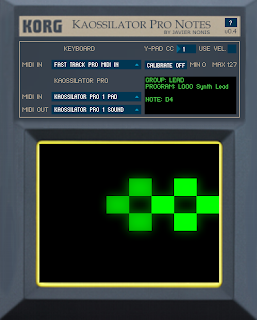
Koassilator Pro Notes v0.4

This is the new version of Kaossilator Pro Notes, these are the changes:
- Fixed issue when some note out of range is pressed and the application hangs.
- Added note played on UI.
- Selected program Sync, now you can change the selected program from either MIDI IN or Kaossilator Pro.


Quick Start

  1. Connect Kaossilator Pro to your computer via USB or MIDI
  2. Set SCALE to "Chr" on your Kaossilator Pro
  3. Set NOTE RANGE to "4oct" on your Kaossilator Pro
  4. Set your keyboard as MIDI IN
  5. Set Kaossilator Pro MIDI IN and MIDI OUT
  6. Enjoy!

Change CC to controlY-Pad
You can change CC# which yuo want to use for controlling Y-Pad, Mod Whell is set by defualt.

Calibrate control range
You can calibrate the values of CC which we use to control Y-Pad, to do that you have to click on “CALIBRATE” button and adjust the minium and maxium value.

Use velocity to control Y-Pad
Activating the option “USE VEL.” you will able to control Y-Pad with keys velocity.

Store Settings
All settings are stored immediately after you have changed them, so the next time you run the application settings will be there exactly as you leave them.

Selected Program Sync

  • You can change the program from MIDI IN.
  • You can change the program from KAOSSILATOR PRO.
  • When app start the fisrt program is selected to keep sync.


Limitations
  • The note range is 4oct because FULL RANGE can change for each preset according user manual.
  • You can set up any scale or note range but the behavior will be unexpected.
  • Due we are emulating a midi control instead sending notes, Kaossilator Pro can only receive one note at time.

About the application
The application was developed on Processing using the Midi Bus and crontrolP5 libraries.


DOWNLOAD


miércoles, 25 de enero de 2012

Kaossilator Pro Notes

Last weekend I wrote a little application in Processing which allows to send notes from a keyboard or midi device to Kaossilator Pro.
To run it you need Java VM installed, I’m only able to test the Windows version, I will try to test the other versions (Linux / Mac).


Quick Start
  1. Connect Kaossilator Pro to your computer via USB or MIDI
  2. Set SCALE to "Chr" on your Kaossilator Pro
  3. Set NOTE RANGE to "4oct" on your Kaossilator Pro
  4. Set your keyboard as MIDI IN
  5. Set Kaossilator Pro as MIDI OUT
  6. Enjoy!

Change CC to controlY-Pad
You can change CC# which yuo want to use for controlling Y-Pad, Mod Whell is set by defualt.

Calibrate control range
You can calibrate the values of CC which we use to control Y-Pad, to do that you have to click on “CALIBRATE” button and adjust the minium and maxium value.

Use velocity to control Y-Pad
Activating the option “USE VEL.” you will able to control Y-Pad with keys velocity.

Store Settings
All settings are stored immediately after you have changed them, so the next time you run the application settings will be there exactly as you leave them.

Limitations
  • The note range is 4oct because FULL RANGE can change for each preset according user manual.
  • You can set up any scale or note range but the behavior will be unexpected.
  • Due we are emulating a midi control instead sending notes, Kaossilator Pro can only receive one note at time.

About the application
The application was developed on Processing using the Midi Bus and crontrolP5 libraries.

DOWNLOAD

martes, 24 de enero de 2012

Kaossilator Pro Missing Features

I bought a Kaossilator Pro a couple of days ago and I found that there are some missing features:

  1. I cannot undo the last overdub, I mean, if I record a new sound over an existing loop and I mess up, I cannot undo that change. This can be done with the Kaossilator.
  2. I cannot join 2 loops, in fact, this option could solve the first problem mentioned.
  3. I cannot send Kaossilator Pro notes from a MIDI keyboard, sometimes a melody I want to add a little more complex melody to a loop and using only the pad is complicated.
  4. Gate Patterns from original Kaossilator are missing, we have control over the 2 parameters of the gate arpeggiator but patterns are fun and easy to use.

Regarding the first 2 problems there is not much that we can do, would be nice if Korg solves this with a firmware update.

But the last 2 problems can be solved using Kaossilator Pro MIDI capabilities, I will try to solve these problem by writing or configuring an application and then I will tell you.